Click here for Sales
×

100gsm White Wood Free Upto 4 CMYK colors (One side)
A4 standard size Minimum Order Quantity : 500
FAQ's of this product.
Q) What if I Want Other Quantity than the quantity displayed?
A) 500, 1000, 2000 Quantities are the standard range in this product, hence there is no option of other quantity. You can also write an email to us, as in this case we have to pass your request to the estimation department to quote you separately.
Q) What is the difference between 1 color, 2 colors, 3 colors and 4 colors?
A) One color printing means any one color you can choose like Black, Blue, Red, Brown, Green etc.. means only one color will be printed apart from white color which is considered as paper color, similarly you can opt for any other color combination in 2 or 3 or 4 color, You can mention the name of the Color or Pantone code in the comments, while placing the order (in the next step) i.e. Upload File or Design It. Click here to see the examples : 1 color, 2 colors, 3 colors, 4 colors.
Q) What does Foiling mean?
A) A Gold or Silver Metallic Film is imprinted through a heated metal block makes the print shine from that particular part. Click here to see the example.
Q) What does Emboss mean?
A) Male - Female blocks press the paper to emboss the graphics. Click here to see the example.
Q) What does Spot UV mean?
A) To make any special part of print shine gloss like water, this technique is used after the printing is done. Click here to see the example.
Q) Is there any technical limitation, which I need to know?
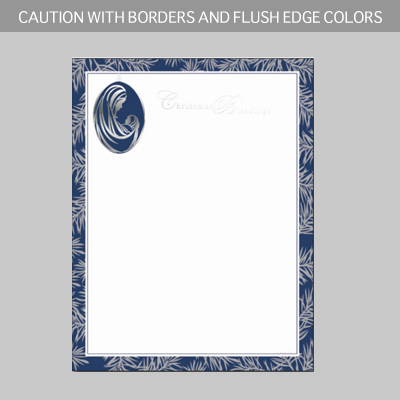
A) Yes, one thing is you must not use borders as they can not be cut with equal distance from all the sides. Click here to see the example.
Q) Can I print on the back of the letterhead?
A) This is not regular requirement, hence it is not inculded here, but you can always send us a custom requirement, separate quote can be given for such requirement.
Important Artwork Guidelines for High-Quality Printing :
To achieve the best possible print results, please ensure your artwork is prepared according to the following guidelines. These recommendations are based on standard offset printing practices and help avoid common issues that may affect print quality.
1. Work With a Professional Designer
We highly recommend having your artwork created or reviewed by an experienced print-design professional. Offset printing involves technical requirements that differ from digital displays, and a professional will ensure your design meets those standards.
2. Background Colors
Avoid using mixed-color or multi-layered dark backgrounds. These may result in muddy or unclear prints. For sharper, cleaner results, use only one solid background color—Cyan, Magenta, Yellow, or 100% Black.
3. Text and Graphics
All text should be vector-based, not rasterized or image-based, to ensure maximum clarity. Rasterized (bitmap) text or low-resolution images may appear pixelated or blurry when printed.
4. Image Resolution
Ensure all images in your artwork are at least 300 DPI (dots per inch) at actual print size. Lower resolutions can result in blurred or grainy prints.
5. Color Mode
Set your artwork to CMYK color mode, not RGB. CMYK is the standard color mode used in offset printing, and using RGB may cause color shifts or unexpected results.
6. Bleed and Safe Area
Include at least 3mm of bleed on all sides of your design. Keep important text and graphics at least 5mm away from the trim edge to prevent accidental cropping.
7. Fonts and Layers
Convert all fonts to outlines or embed them, and flatten any layers before final submission to avoid compatibility issues.
8. File Format
Preferred file formats are PDF, AI, or EPS with print-ready settings. Avoid sending files in Word, PowerPoint, or low-resolution JPEG formats.
| Product name | Standard Letter Head |
|---|---|
| Starting price | AED175.00 |
| Bulk pricing | Available |
| Delivery | Dubai + UAE |
| Design | Available as addon |
| Standard delivery | 5 working days |
| Express delivery | 2 working days |
You will be redirected to Canva Templates to Design (Customize) this product. Continue?
Reviews come from customers who bought this product, so we just need to match your order first.
We check every review before it appears. You will get an email when yours is published.